
Schauerland
Member
Hi,
Okay I just figured out a thing that was smashing my brain for a while.
I record lossless crf=0 in 2560x1440@60fps
In Adobe Premiere the video was often very choppy, espacially with games with high motion an graphics (like The Forest)
I always thought my pc was not fast enough for premiere, so i bough a new cpu (i7-4790K)
But still Premiere only gets out 1 fps on some parts of the video.
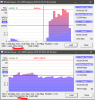
I use a tool to check the bitrate of a video and TODAY i saw something strange (see screenshots)
all game recordings that are marked as 60FPS are actual 59.49 fps while desktop recordings (Display Capture) are 60 FPS (as long as you dont play a game)
I first though this was the fault of Bitrate viewer showing wrong fps, BUT when i changed the fps of the video in premiere (how to handle the file) from 60 to 59.49 it runs smooth. No more choppy.
So for me, it seems the recording is really 59.49 fps - how can that be?
My Monitor is a Dell U2515Hc and running 256x1440@60hz (The OSD says 60hz but windows says it has 59hz)
Can this cause this effect?
Any idears to force 60fps?
Okay I just figured out a thing that was smashing my brain for a while.
I record lossless crf=0 in 2560x1440@60fps
In Adobe Premiere the video was often very choppy, espacially with games with high motion an graphics (like The Forest)
I always thought my pc was not fast enough for premiere, so i bough a new cpu (i7-4790K)
But still Premiere only gets out 1 fps on some parts of the video.
I use a tool to check the bitrate of a video and TODAY i saw something strange (see screenshots)
all game recordings that are marked as 60FPS are actual 59.49 fps while desktop recordings (Display Capture) are 60 FPS (as long as you dont play a game)
I first though this was the fault of Bitrate viewer showing wrong fps, BUT when i changed the fps of the video in premiere (how to handle the file) from 60 to 59.49 it runs smooth. No more choppy.
So for me, it seems the recording is really 59.49 fps - how can that be?
My Monitor is a Dell U2515Hc and running 256x1440@60hz (The OSD says 60hz but windows says it has 59hz)
Can this cause this effect?
Any idears to force 60fps?